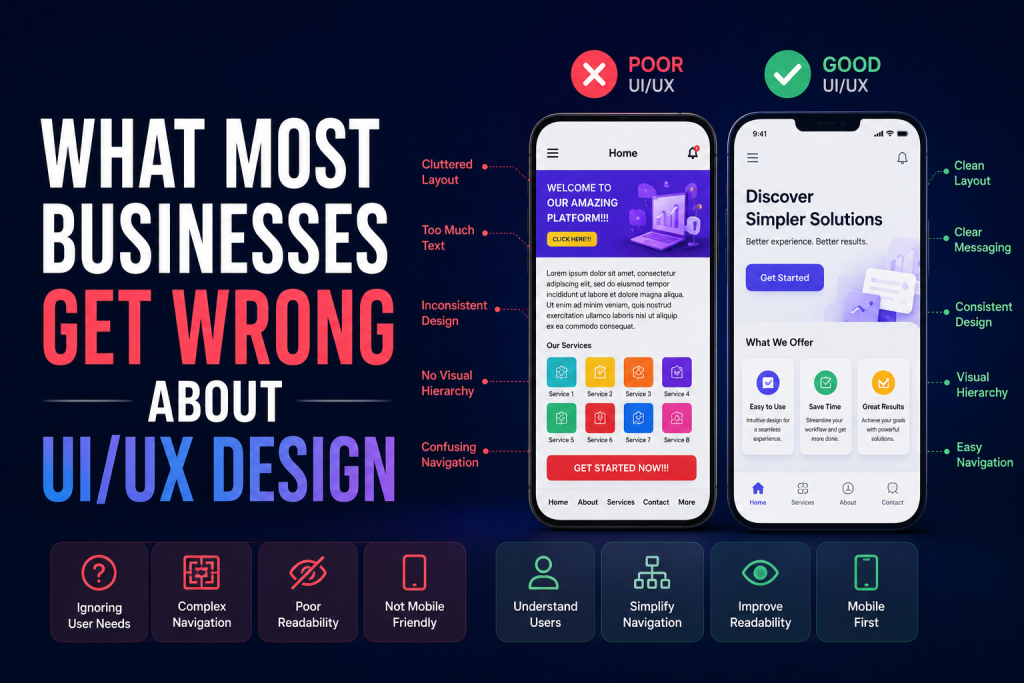
Users don’t just interact with apps and websites — they feel them. Every color, shape, interaction, and animation evokes an emotion and influences how users behave. That’s the real power of UI/UX design: shaping not just what users do, but how they feel while doing it.
When done right, great design turns casual visitors into loyal users, and one-time buyers into brand advocates. Let’s explore how UI/UX design affects human behavior and emotions — and how you can use it to create unforgettable digital experiences.
1. The Emotional Side of Design
People make decisions based on emotions far more than logic — and digital products are no exception. Emotional design connects users to products on a deeper level.
For example:
- Warm colors (like orange or red) can create excitement or urgency.
- Cool colors (like blue or green) make users feel calm and confident.
- Rounded shapes appear friendly and inviting.
- Sharp edges can communicate precision and professionalism.
When designers use these psychological triggers intentionally, they create experiences that resonate and feel natural.
2. First Impressions Happen in Seconds
Did you know that users form an opinion about your website or app in less than 0.1 seconds? That first impression is 94% design-related.
A well-crafted UI design immediately communicates trust, quality, and ease of use. A confusing or cluttered interface, on the other hand, triggers frustration and distrust.
Key takeaways:
- Keep designs simple and clutter-free.
- Use consistent branding and color schemes.
- Ensure fast loading times (slow design = lost users).
Your interface is your brand’s first handshake with users — make it memorable.
3. UX Design Influences Decision-Making
Great UX design guides users intuitively toward desired actions. Whether it’s signing up, making a purchase, or exploring content, every interaction should feel effortless.
Examples:
- Clear navigation reduces cognitive load and boosts confidence.
- Progress indicators motivate users to complete actions (like filling forms).
- Micro-interactions (like animations or haptic feedback) make experiences satisfying.
In short: UX design doesn’t just help users move — it helps them want to move in the right direction.
4. Visual Hierarchy Drives Focus
Human eyes naturally follow visual cues. Designers use visual hierarchy to direct attention to the most important elements first.
How to apply it:
- Use contrast (color, size, spacing) to highlight key actions.
- Place CTAs (Call-To-Actions) where users expect them.
- Use whitespace effectively to improve readability.
When users can quickly find what they’re looking for, their satisfaction increases — and so does your conversion rate.
5. Colors and Typography Affect Mood
Color psychology and typography have a direct impact on emotion and perception.
Color Guidelines:
- Blue = Trust, security, calm
- Green = Growth, balance, health
- Yellow = Energy, optimism
- Black/Gray = Luxury, power, professionalism
Typography Tips:
- Use modern sans-serif fonts for digital clarity.
- Maintain consistent font hierarchy (titles, subtitles, body).
- Avoid overly decorative fonts that distract users.
Your choice of color and type should always align with your brand’s personality and emotional tone.
6. Interaction Design Builds Engagement
Micro-interactions — like button hover effects, animations, or scroll transitions — give users feedback and make them feel in control.
Examples:
- A button changes color when clicked (confirmation).
- A success animation appears after submitting a form.
- Subtle motion guides the user to the next step.
These small moments of delight can turn a routine task into an enjoyable experience — keeping users emotionally invested.
7. Consistency Creates Comfort and Trust
Humans crave predictability. Consistency in UI/UX design creates familiarity and comfort, which in turn fosters trust.
Maintain consistency in:
- Colors and typography
- Iconography and button styles
- Navigation patterns
- Tone of voice and messaging
When everything feels familiar, users subconsciously feel safer — leading to longer sessions and stronger engagement.
8. Accessibility Enhances Emotional Connection
Inclusive design isn’t just ethical — it’s emotional. When users of all abilities can easily use your product, it communicates empathy and respect.
Accessibility best practices:
- Maintain text contrast for readability
- Provide alt text for images
- Enable keyboard navigation
- Use descriptive links and buttons
An accessible design says: “We care about every user.” That’s a powerful emotional message.
9. Storytelling Through Design
Humans connect with stories more than features. A well-designed interface tells a story — about your brand, your users, and their journey.
Example:
Airbnb’s clean layout and photography make users feel at home even before booking. The design communicates belonging — not just travel.
When UI/UX design aligns with storytelling, it transforms digital interactions into meaningful experiences.
10. Testing and Emotional Feedback
Great designers don’t assume — they observe. Usability testing and emotional mapping help you understand how users feel at each stage.
Try:
- A/B testing for different layouts or button colors
- Heatmaps to analyze engagement
- User interviews to uncover emotional responses
When you listen to user emotions, your design evolves from functional to unforgettable.
Conclusion
UI/UX design is far more than aesthetics — it’s a bridge between human emotion and technology. Every color, line, and interaction subtly shapes how users think, feel, and behave.
By understanding emotional triggers and user psychology, designers can create products that not only work beautifully but also feel right. Because at the heart of every successful design is one goal: making users happy.